How to black out numbers on a bank statement
Take a screenshot of the statement page (or export it as an image) and open it in the tool below with Numbers selected: Pip blacks out account, routing, card and phone numbers and IBANs with solid boxes, and outlines amounts, names and addresses so you can choose. On our test statement it covered 6 of 6 numbers. Keep what the recipient needs to see.
Black out account, card and phone numbers
Choose or paste a screenshot
or drop it here, or press Ctrl+V / ⌘V
You picked several images. Batch (a whole set at once) is part of Pro, coming soon; we opened the first one.
Check every box before you save. Detection can miss things, especially small, blurry or handwritten text and faces turned away. Tap a box to uncover it; tap a word to cover it; use Draw a box for anything else.
Location data removed. The original had GPS coordinates in it; the copy you save has none.
Pro is coming soon · $9.99 lifetime or $2.99 a month
- No daily limit (the free plan will allow 3 images a day)
- Batch: a whole set of screenshots or photos at once
- Video face blur (later)
Everything above is free while we launch. Leave your email and we'll write once, when Pro is ready.
Runs in your browser. Nothing is uploaded. No sign-up.
Which numbers on a bank statement should you black out?
Cover what someone could use to take money out or open accounts, and keep what the recipient needs to check:
| Usually cover | Usually keep visible |
|---|---|
| Full account number | Your name (it has to match) |
| Routing number | The bank’s name and logo |
| Card numbers | The statement dates |
| IBAN, sort code | Deposits, if you’re proving income |
| Other people’s names and account numbers in transfers | The ending balance, if asked for |
| Phone numbers and email addresses (more on phone numbers) |
The CFPB explains that businesses often let you pay bills by ACH by giving your account number and bank routing number, which is why that pair deserves the most care. Whether to cover amounts and transaction descriptions depends on who’s asking: a landlord checking income needs the deposits, not your grocery bills. When in doubt, ask them what they actually need.
How do you black out numbers on a bank statement with this tool?
- Get the statement as an image. In your bank’s app or the PDF, take a screenshot of each page. On a computer, you can also export or print each page to an image.
- Open it in the tool at the top of this page, with Numbers selected.
- Check the boxes. Account, routing, card and phone numbers and IBANs are blacked out. Names, addresses, emails and amounts are outlined but visible: tap any of them to cover it, or tap Cover all text for everything.
- Save the image (PNG) and send that.
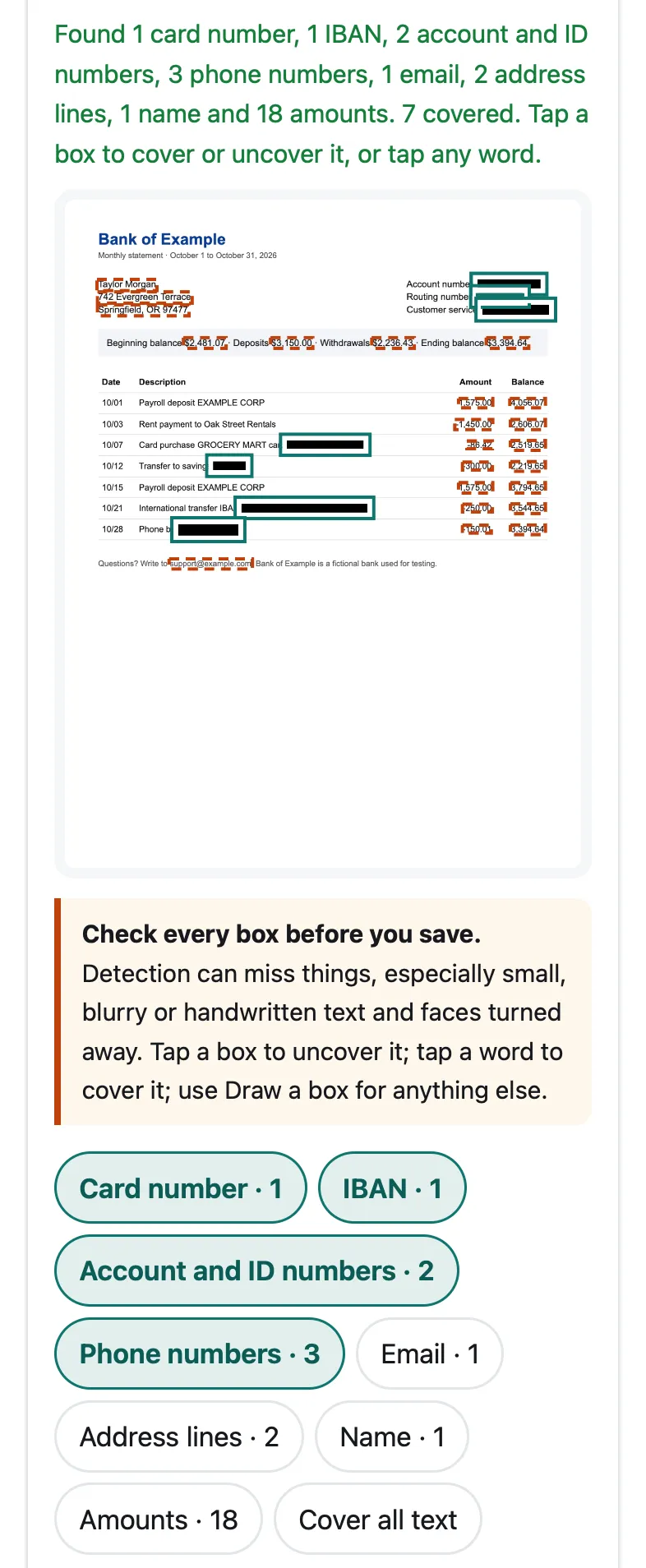
Our fictional “Bank of Example” statement in Pip, at iPhone 15 size in Safari’s engine. All six account, card and phone numbers were covered; amounts, the name and the address are outlined for you to decide.
How reliable is it?
On our fictional statement (1275 × 1650 pixels, the size of a page screenshot), Pip covered all 6 planted numbers: the account number, the routing number, a full card number in a transaction, a masked savings account (“****4821”), an IBAN and a phone number. It also found the bank’s customer service number and an email, the name and address, and 18 amounts. Reading the page took 1.2 seconds in WebKit, Safari’s engine, on a Mac with an Apple M4 chip, on November 22, 2026.
Two checks reduce false alarms and misses: card numbers are verified with the Luhn checksum every card number passes, and IBANs with their check digits. A long digit string that fails them is still covered, as an account or ID number.
What it can miss: numbers in very small print, in a scanned or photographed page with shadows, or split oddly across columns. Check every line before you save. To read back what we covered, we ran the saved statement through the text reader again: none of the six numbers came back, with the solid box or with Pip’s blur.
Why not just use a PDF editor?
You can, if you check the result. Many PDF tools have a real redaction feature that deletes the text under the box; some only draw a black rectangle on top, and the number can still be selected, copied or found by search. After redacting a PDF, select the area and paste it into a note: if the number appears, it isn’t gone. A screenshot that’s covered and saved as an image doesn’t have this problem, because an image has no text layer.
Is it safe to email a bank statement?
Once the account and card numbers are covered, a statement mostly shows your name, address and spending. That’s still personal, so send it only to someone who needs it, and ask how they’ll store it. For ID documents the same thinking applies: see how to send a copy of your passport or ID safely. If you’re sending a screenshot of messages or an app rather than a statement, blur text in a screenshot covers names, emails and usernames too.
Does this work on Android and computers?
Yes. Pip runs in Chrome, Safari, Edge and Firefox. On Android, Google Photos also has a Redact brush (Edit, Markup, Redact) that covers what you brush over by hand; Pip finds the numbers for you.
Questions people ask
Should you black out the account number on a bank statement?
Usually, yes, unless the person needs it to pay you. The CFPB notes that businesses often let you pay by ACH with just an account number and routing number, so those two together are worth protecting. A landlord or lender checking income usually needs your name, the bank's name, the dates and the deposits, not the full account number; ask if you're unsure.
Is it OK to show the last 4 digits?
It's common practice: statements and receipts often show only the last digits. U.S. law, for example, bars printing more than the last 5 digits of a card number on electronically printed receipts. Pip covers masked numbers like ****4821 too; tap the box to uncover them if the recipient needs to match the account.
How do I redact a PDF bank statement?
Pip works on images, so take a screenshot of each page or export the pages as images, then cover the numbers here and send the saved images. If you draw black boxes in a PDF editor instead, check the result by selecting and copying the text underneath; a box on top doesn't always remove the text.
Can I redact a bank statement on my iPhone?
Yes. Open the statement in your bank's app or the PDF, take a screenshot, then open this page in Safari and pick the screenshot. Save to Photos puts the covered copy in your library.
Will the person I send it to be able to see under the black boxes?
No. The boxes are drawn into the pixels of a new image with no layers or metadata, so the numbers aren't in the file.
Related
- Blur text in a screenshotHide names, numbers and emails in a screenshot so they can't be read back. Pip covers them in your browser, nothing uploaded. Free, works on iPhone.
- Send a copy of your ID safelyBefore you send a photo of your passport or ID: what to ask, what you can cover, and how to stamp the copy with who it's for. Official advice, free tool.
- Hide names in a chatCover the contact name, sender names, phone numbers and usernames in a WhatsApp, iMessage or Messenger screenshot. In your browser, nothing uploaded.
- All Pip toolsHide faces, names and numbers in screenshots and photos