How to safely send a copy of your passport or ID
Ask why they need a copy and whether seeing the ID would do. If a copy is needed, send only the page they need, cover what they don't need (such as the code lines at the bottom or your photo, where allowed), and mark the copy with who it's for and the date, as the Dutch government advises. Don't cover anything when the law requires a full copy, such as Right to Rent checks in England.
Sending a photo of your passport or driver’s license is a normal part of renting a flat, starting a job or booking some trips. Most of the time it’s fine. What you can control is who gets it, how much of it they get, and whether the copy can be reused by someone else.
Should you send a copy at all?
Ask two questions first:
- Who is asking? Use contact details you found yourself, not a link or number in an unexpected message. The UK’s Information Commissioner’s Office advises being wary of unexpected contact asking for your details and contacting organizations through the details they’ve already given you, and notes that “the less you give away about yourself, the lower the risk” (ICO). The US FTC warns that job scammers ask for a driver’s license or bank details to fill out “employment paperwork”, and that real employers don’t ask before they’ve interviewed and hired you (FTC).
- Do they need a copy, or would seeing it do? The Dutch government notes that registering the type of ID and the document number is often enough (government.nl). France’s data protection authority, the CNIL, says you generally don’t need to send an ID copy just to exercise your data rights (CNIL).
When must you send a full, uncovered copy?
Sometimes the law decides. In England, landlords must check that a tenant can legally rent and, for a passport, copy the pages with the expiry date and the holder’s details, as a copy “that cannot be changed”, kept for the tenancy and one year after (gov.uk Right to Rent). Covering parts of it there would defeat the check. France’s Filigrane Facile service also warns that some organizations, such as banks and public services, may need a document without a watermark. If you’re not sure, ask before you cover anything.
Pip is for protecting your privacy when you share. It covers and stamps; it doesn’t change what a document says, and no one should use any editor to alter an ID.
What can you cover on a passport copy?
When the recipient doesn’t need them, the Dutch government suggests covering your photo and your citizen service number, including in the strip of code at the bottom. That strip is the machine-readable zone: on a passport it’s 2 lines of 44 characters, and the second line repeats your passport number, nationality, date of birth, sex and expiry date with check digits (ICAO Doc 9303, part 4). On ID cards it’s 3 lines of 30. A copy with the printed number covered but the code lines visible still contains the number.
How do you make a safer ID copy here?
Make a safer copy of your passport or ID
Choose or paste a photo of your ID
or drop it here, or press Ctrl+V / ⌘V
You picked several images. Batch (a whole set at once) is part of Pro, coming soon; we opened the first one.
Check every box before you save. Detection can miss things, especially small, blurry or handwritten text and faces turned away. Tap a box to uncover it; tap a word to cover it; use Draw a box for anything else.
Location data removed. The original had GPS coordinates in it; the copy you save has none.
Pro is coming soon · $9.99 lifetime or $2.99 a month
- No daily limit (the free plan will allow 3 images a day)
- Batch: a whole set of screenshots or photos at once
- Video face blur (later)
Everything above is free while we launch. Leave your email and we'll write once, when Pro is ready.
Runs in your browser. Nothing is uploaded. No sign-up.
- Take a clear photo or scan of the page you need, flat and in good light, and open it above.
- Pip reads it and covers the code lines at the bottom and the document number. Everything else is left as it is; tap to cover more (a personal number, your signature, your photo) if the recipient doesn’t need it.
- Fill in Who is this copy for? (for example “Oak Street Rentals”) and the date. Pip stamps “For Oak Street Rentals only · Nov 22, 2026” across the whole image, semi-transparent, so the document stays readable.
- Save and send the saved copy. It’s a flattened image with no location or camera data; the stamp and covers can’t be lifted off.
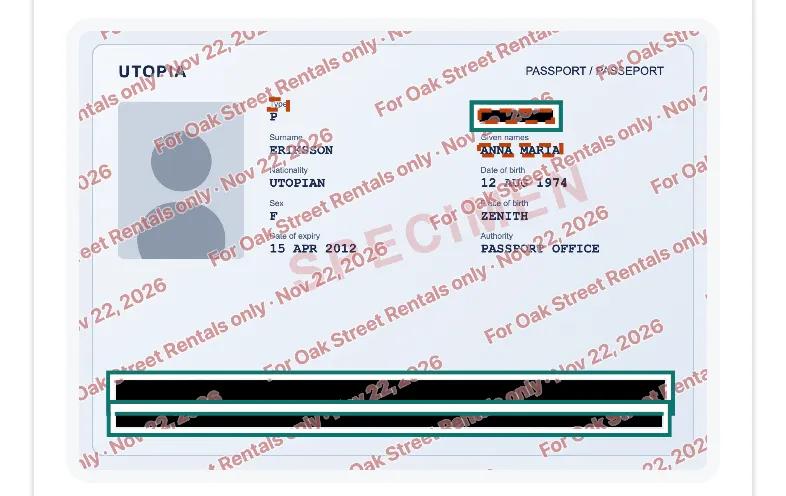
ICAO’s fictional “Utopia” specimen data, rendered for our tests and shown in Pip at iPhone 15 size. Both code lines and the passport number were covered automatically.
On that specimen, Pip covered 3 of 3 (both code lines and the passport number) in 0.8 seconds, in WebKit, Safari’s engine, on a Mac with an Apple M4 chip (November 22, 2026). Real IDs have security patterns and holograms behind the text, so check every box.
Why stamp who the copy is for?
A copy with “For Oak Street Rentals only, Nov 22, 2026” across it is much less useful to anyone else: another landlord, bank or website would see that it was made for someone else, on another date. The Dutch government recommends writing on a copy that it is a copy, who it’s for and the date, and points to its KopieID app for this. France’s government runs Filigrane Facile, a free service that adds such a watermark (its example reads “Document exclusivement destiné à la location immobilière”); it processes files on its servers and deletes them afterwards. Pip does the same kind of stamp in your browser, with nothing uploaded.
What else should you do after sending it?
- Send it once, to one place. Avoid posting it in group chats or shared folders.
- Ask how long they keep it and how they’ll delete it. In England, Right to Rent copies are kept for the tenancy plus one year.
- Delete your sent copy from chats and email when it’s done, and from your Downloads folder.
- Check the photo file: a photo of your ID taken at home can carry your home’s GPS location. Pip’s saved copy has none; for other photos, see how to remove location from a photo.
- Sending a bank statement with it? See how to black out numbers on a bank statement. For screenshots of messages or apps, see blur text in a screenshot.
Questions people ask
Is it safe to send a picture of my passport?
It's often necessary and usually fine when the recipient is who they say they are and actually needs it. The risk is what happens to the copy afterwards: it can be reused or leaked. Send it only when asked by an organization you contacted, send only what's needed, and mark the copy with who it's for and the date.
Is it safe to send a picture of my passport by email or WhatsApp?
The channel matters less than the recipient. Check you're writing to the real organization, using contact details you found yourself, as the UK ICO advises, not a link in an unexpected message. Then send a marked copy and ask how long they keep it.
What can I cover on a copy of my passport?
What the recipient doesn't need. The Dutch government suggests covering your photo and your citizen service number (BSN), including where it appears in the code lines at the bottom, when the organization doesn't need them. Some recipients, such as landlords doing Right to Rent checks in England, must keep a complete copy, and banks or public services may need an unmarked one; ask first.
Should I watermark a copy of my ID?
It helps. A note across the copy saying who it's for, what it's for and the date makes it harder to reuse elsewhere. The Dutch government recommends writing that on copies, and France runs a free official watermarking service, Filigrane Facile, for documents sent for rentals.
What is the code at the bottom of my passport?
The machine-readable zone: two lines of 44 characters on a passport (three lines of 30 on an ID card) that repeat your name, passport number, nationality, date of birth, sex and expiry date for scanners, with check digits. If you cover the printed number but not these lines, the number is still on the copy.
Related
- Black out a bank statementBlack out account, routing and card numbers on a bank statement before you send it. Found for you in your browser; nothing uploaded. Free, works on phones.
- Remove photo locationSee whether a photo carries its GPS location, camera and date, then save a copy without them, without re-saving the picture. In your browser, free.
- Blur text in a screenshotHide names, numbers and emails in a screenshot so they can't be read back. Pip covers them in your browser, nothing uploaded. Free, works on iPhone.
- All guidesEvery Pip guide, by task.