How to blur out text in a screenshot
Open the screenshot in the tool below. Pip reads the text, boxes names, phone and card numbers, emails and addresses, and covers them; tap any word to add it. Use a solid box for text: in our test, a light 3-pixel blur left all 6 private details readable to a text reader, while Pip's box, blur and pixels left none.
Hide names, numbers and faces in a screenshot or photo
Choose or paste a screenshot
or drop it here, or press Ctrl+V / ⌘V
You picked several images. Batch (a whole set at once) is part of Pro, coming soon; we opened the first one.
Check every box before you save. Detection can miss things, especially small, blurry or handwritten text and faces turned away. Tap a box to uncover it; tap a word to cover it; use Draw a box for anything else.
Location data removed. The original had GPS coordinates in it; the copy you save has none.
Pro is coming soon · $9.99 lifetime or $2.99 a month
- No daily limit (the free plan will allow 3 images a day)
- Batch: a whole set of screenshots or photos at once
- Video face blur (later)
Everything above is free while we launch. Leave your email and we'll write once, when Pro is ready.
Runs in your browser. Nothing is uploaded. No sign-up.
Can blurred text in a screenshot be read?
It depends on how strong the blur is, and people usually use too little. We tested it. We took our fictional iMessage-style screenshot (iPhone 15 size, 1179 × 2556 pixels) with 6 private details in it (a name, a phone number, an email, a username, an address and a second name) and covered those details in different ways. Then we ran every version through the same text reader Pip uses (Tesseract) and counted how many details came back word for word.
| Covered with | Details still readable (of 6) |
|---|---|
| Nothing (the original) | 6 |
| Light blur, 3 px | 6 |
| Blur, 6 px | 0 |
| Small pixels, 6 px blocks | 1 |
| Pixels, 10 px blocks | 0 |
| Pip: solid box | 0 |
| Pip: blur | 0 |
| Pip: pixels | 0 |
| Pip: emoji | 0 |
Measured on November 22, 2026, on a Mac with an Apple M4 chip. The 3 px and 6 px versions were drawn with a standard canvas blur filter, the kind many web editors use. Our statement test (smaller text) was unreadable even at 3 px, so size matters as much as strength.
A text reader is a crude attacker. Researchers have gone further: McPherson, Shokri and Shmatikov showed in 2016 that a neural network could still identify blurred and pixelated faces and digits far better than chance, and the open-source Depix and Bishop Fox’s Unredacter recovered text from pixelated screenshots when the font was known. Bishop Fox’s advice was simply to use solid black bars. Our guide can blurred text be unblurred? has the full test, with more blur and pixel sizes.
So Pip covers text with a solid box unless you choose otherwise. If you pick blur or pixels, the blur window and the pixel blocks are sized to the letters (about 60% of the line height), and a little random noise is added so blocks can’t be matched exactly against guessed text.
How do you blur text in a screenshot with this tool?
- Open the screenshot in the tool at the top of this page: tap Choose a screenshot or photo, drop the file on it, or paste it (Ctrl+V or ⌘V). On iPhone you can pick from Photos or Files.
- Let it read the text. The first time, your browser downloads the text reader (about 7 MB); after that it starts at once. A phone screenshot took about a second on our test Mac, longer on a phone.
- Check the boxes. Names, usernames, phone, card and account numbers, emails, addresses and plates are covered for you. Other finds, like amounts, are outlined but left visible.
- Tap to fix it. Tap a covered box to uncover it, tap any word to cover it, or turn on Draw a box and drag over anything else.
- Save. Download, or on a phone tap Save to Photos or share. The saved PNG is the same size as your screenshot, with the cover flattened into it.
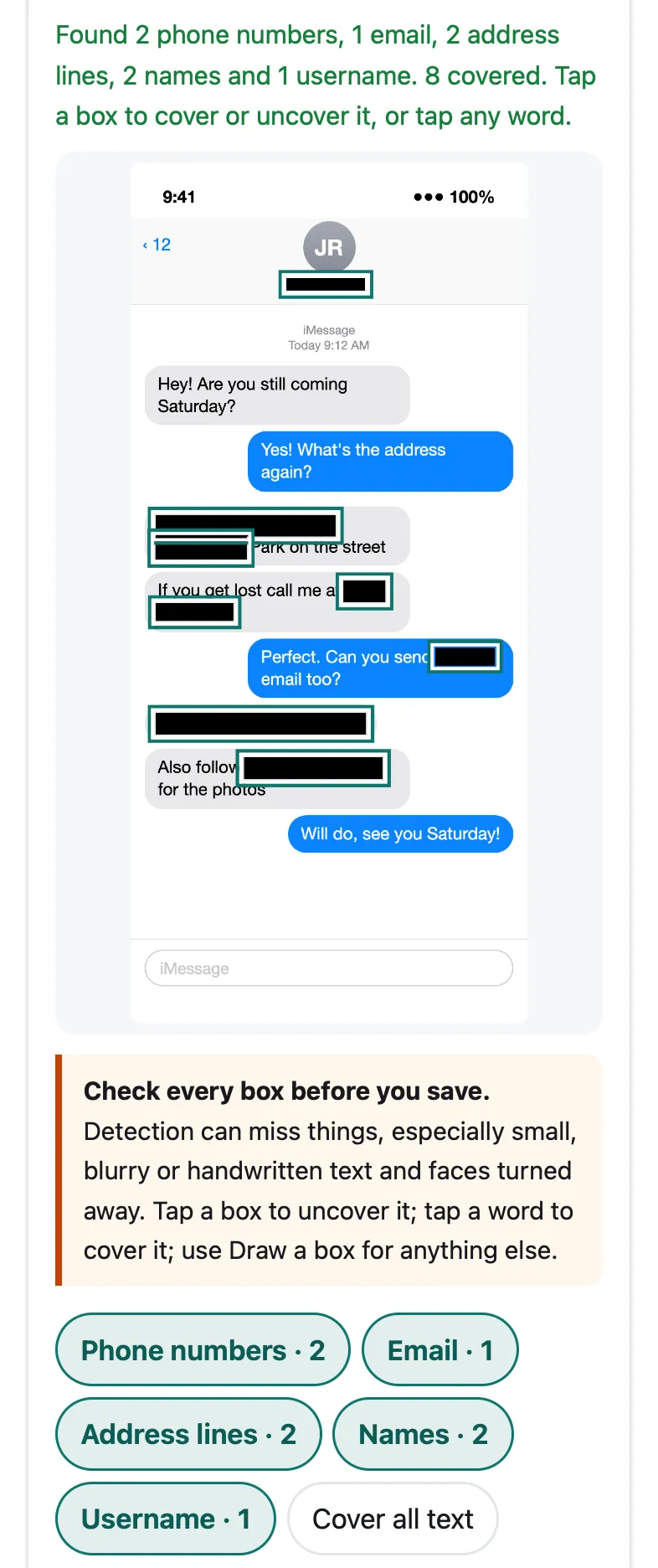
Pip in Safari’s engine at iPhone 15 size, on our fictional test chat. Every private detail was boxed automatically.
Can you blur text on iPhone without an app?
Not with a blur. Apple’s Markup (in Photos, tap Edit, then Markup) has a pen, marker, pencil, eraser, lasso and ruler, plus shapes, text and stickers, and Apple’s guide lists no blur or pixelate tool as of iOS 27. What works is a filled shape: tap the Add button, then Add Shape, and set the fill color and opacity to a solid color at full opacity.
Be careful with the marker. It is semi-transparent unless you drag its opacity slider to the end, and in 2018 9to5Mac showed that brightening a screenshot reveals text under marker strokes. Our guide to censoring a picture on iPhone walks through the built-in way step by step.
How do you blur text in a screenshot on Android?
Google added a proper tool. In Google Photos for Android, open the screenshot, tap Edit, then Markup, then Redact, and brush over the text. Google’s help page says that when you share a redacted photo, others can’t undo it; it needs Android 8.0 or later and 3 GB of memory. If your phone has it, it’s a good built-in choice. What it doesn’t do is find the text for you, which matters on a long chat or a statement with a dozen numbers.
Which details should you cover in a screenshot?
Think about what a stranger could do with the screenshot:
- Names and usernames in a chat header, sender labels, @handles and email addresses. See how to hide names in a chat screenshot.
- Phone numbers, including ones that wrap onto a second line (Pip joins them); see how to hide a phone number in a screenshot.
- Card, account and routing numbers, IBANs. Pip checks card numbers with the Luhn checksum and IBANs with their check digits. For statements, see how to black out a bank statement.
- Addresses: street lines, ZIP or postal codes, apartment numbers.
- Profile pictures and faces in the screenshot: tap Find faces too.
- The status bar: the time and carrier rarely matter, but a notification preview can.
What does Pip find, and what can it miss?
On our own fictional test screenshots, all made for these tests, Pip covered every planted detail with the matching preset: 6 of 6 on the iMessage-style chat, 9 of 9 on a dark-mode group chat, 3 of 3 on a shipping confirmation, 6 of 6 numbers on a bank statement and 3 of 3 on a specimen passport page. Reading took 0.5 to 1.2 seconds per screenshot in WebKit, Safari’s engine, on the same Mac.
Real screenshots are messier. The text reader can skip small or faint text, handwriting, text over photos and unusual fonts, and names that don’t look like names (a nickname, an emoji) aren’t guessed. That’s why the tool says check every box before you save, and why every word it read can be tapped to cover it.
Questions people ask
Can someone unblur text in a screenshot?
Sometimes. A light blur keeps the shape of the letters, and a text reader read all 6 private details we had blurred with a 3-pixel blur on a phone screenshot. Pixelation with small blocks has been reversed by published tools such as Depix and Bishop Fox's Unredacter when the font is known. A solid box can't be undone, which is why Pip uses it for text by default.
Is it better to blur or black out text in a screenshot?
Black it out. A solid box replaces the pixels completely. Blur and pixels are fine for faces and backgrounds, but for text they have to be very strong to be safe: Pip makes its blur and pixel blocks about as large as the letters, and in our test none of the covered details could be read back.
How do I hide text in a screenshot on iPhone?
In Photos, open the screenshot, tap Edit, then Markup, then the Add button and Add Shape, and set a solid fill at full opacity. Markup has no blur tool. Or open the screenshot in this page in Safari, let Pip find the text, and tap Save to Photos.
Does a screenshot keep the text I covered somewhere in the file?
Not if it's flattened. Pip draws the cover into the pixels and saves a new PNG with no layers and no metadata, so there is nothing underneath to recover. Some editors save edits as a separate layer or keep the original for undo; that matters if you share the original file.
How do you hide part of a text message before sending a screenshot?
Take the screenshot, open it here, and pick Names in a chat: names, phone numbers, emails, usernames and addresses are covered for you. Tap anything else you want hidden, then save and send the saved copy.
Related
- Hide names in a chatCover the contact name, sender names, phone numbers and usernames in a WhatsApp, iMessage or Messenger screenshot. In your browser, nothing uploaded.
- Black out a bank statementBlack out account, routing and card numbers on a bank statement before you send it. Found for you in your browser; nothing uploaded. Free, works on phones.
- Censor a picture on iPhoneCover part of a photo or screenshot on iPhone so it can't be seen or undone: Markup's filled shapes, the marker trap, Clean Up, or blur in Safari.
- All Pip toolsHide faces, names and numbers in screenshots and photos