How to blur a license plate in a photo
Open the photo in the tool below with License plate selected: Pip looks for short lines of letters and numbers, reads each one, and covers the ones shaped like a plate. In our two test photos it covered the plate both times. If a plate isn't boxed, tap Draw a box and drag over it, then save.
Cover a license plate
Choose or paste a car photo
or drop it here, or press Ctrl+V / ⌘V
You picked several images. Batch (a whole set at once) is part of Pro, coming soon; we opened the first one.
Check every box before you save. Detection can miss things, especially small, blurry or handwritten text and faces turned away. Tap a box to uncover it; tap a word to cover it; use Draw a box for anything else.
Location data removed. The original had GPS coordinates in it; the copy you save has none.
Pro is coming soon · $9.99 lifetime or $2.99 a month
- No daily limit (the free plan will allow 3 images a day)
- Batch: a whole set of screenshots or photos at once
- Video face blur (later)
Everything above is free while we launch. Leave your email and we'll write once, when Pro is ready.
Runs in your browser. Nothing is uploaded. No sign-up.
How do you blur a license plate in a photo?
- Open the photo in the tool at the top: tap Choose a screenshot or photo, or drop the file on it. On iPhone, pick it from Photos.
- Keep License plate selected. The first time, the text reader downloads (about 7 MB); then Pip looks for plates.
- Check the result. Each plate it found is covered and boxed. If yours isn’t, tap Draw a box and drag over it. Tap a box to uncover it if it covered something else, like a badge.
- Pick a style (solid box is the default for plates), then Download or Save to Photos.
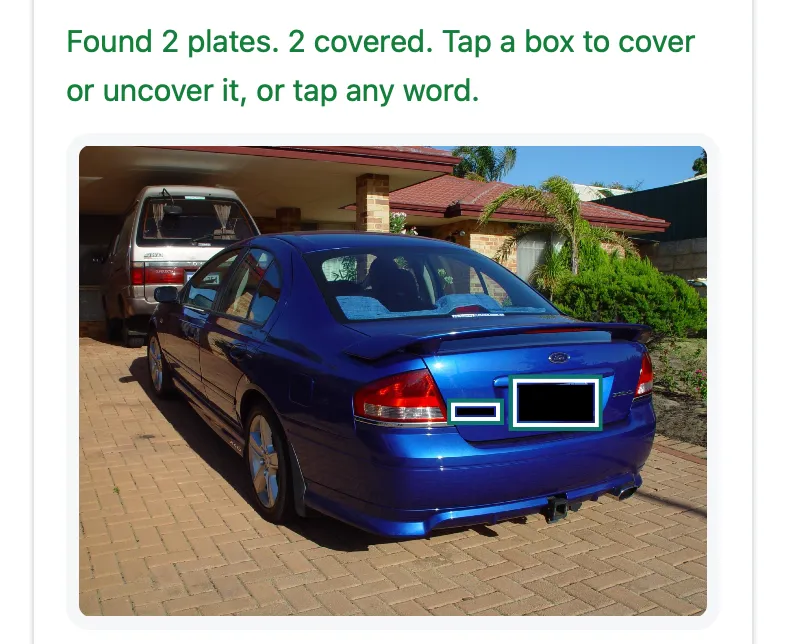
Pip in Safari’s engine at iPhone 15 size. Photo: “Car ford falcon ba xr6 rear view” by Leon Brooks, public domain (Wikimedia Commons).

How does it find the plate?
A general text reader is good at documents and poor at street scenes, so Pip does it in two steps. First it looks for short rows of 4 to 10 character-shaped marks of the same height, dark on light or light on dark, which is what a plate looks like. Then it reads each row on its own as a single line and keeps the ones shaped like a plate: four to ten capitals and digits, such as “LJ 759-LJ” or a custom plate like “BAXRSIX”. It doesn’t need to read the plate perfectly to cover it.
In our tests, on a Mac with an Apple M4 chip (November 22, 2026):
| Photo | Plate covered | Other boxes |
|---|---|---|
| Ford sedan from behind, custom plate (public domain) | Yes | 1 (the car’s model badge) |
| Mercedes in a parking lot, European plate (CC0) | Yes | 1 (a patch of pavement) |
| Group photo of 15 people, no cars (public domain) | No plate, none covered | 0 in Chromium, 1 in WebKit |
Reading a photo took 1.5 to 1.6 seconds in WebKit, Safari’s engine, after the text reader loaded. A half-visible plate at the edge of the Mercedes photo was not found: draw a box over plates like that.
Should you blur your license plate when selling a car?
It’s a common precaution, not a rule. In the U.S., the Driver’s Privacy Protection Act limits what a state DMV may disclose from motor vehicle records: personal information such as your name, address and phone number (the 5-digit ZIP code isn’t included) can’t be released except for listed uses, including law enforcement, insurers, courts, towing notices and licensed private investigators. So a stranger can’t simply look you up from your plate, but plenty of businesses can.
Sellers usually blur the plate in public listing photos and share it, along with the vehicle details, with a buyer who’s serious. While you’re at it, check the background for your house number and street sign, see how to blur an address in a photo, and remember that a photo straight from your phone usually carries its GPS location: Pip’s saved copy doesn’t. For photos you post as they are, see how to remove location from a photo.
Do Google and others blur plates automatically?
Google Street View does: Google says it uses “face and license plate blurring technology” on its imagery, and you can ask for more blurring with the Report a problem link on any Street View image (Google’s Street View policy). Phone photo apps don’t do it for you: iPhone’s Markup has no blur tool at all, we found no automatic plate blur documented for Samsung’s Gallery editor, and Google Photos for Android has a Redact brush you drag over the plate by hand.
What about plates in videos?
Pip works on photos and screenshots. Video face and plate blurring is planned for later. For now, take a still from the video or use a video editor’s mosaic tool.
What else is in a car photo?
- Other cars’ plates: blur them too; they belong to other people.
- Parking permits, toll tags and stickers in the windshield can name a school, employer or neighborhood.
- Faces of people nearby: tap Find faces too, or see how to blur faces in a photo and blurring strangers in the background.
- The VIN under the windshield: buyers will ask for it, but there’s no need to post it.
Questions people ask
Should I blur my license plate when selling my car?
Many sellers do, as a simple precaution, and buyers rarely need the plate to decide. In the U.S. the Driver's Privacy Protection Act limits what state motor vehicle offices may disclose from their records, but it lists many permitted uses, so a plate isn't a secret. Covering it in public photos costs nothing; give the details to a serious buyer directly.
Should I blur my license plate on Facebook Marketplace or Instagram?
If the post is public and you'd rather strangers didn't link the car to you, yes. Also check the rest of the photo: a house number, a street sign or the photo's location data can say more than the plate. Pip's saved copy has no location data.
Can someone find my address from my license plate?
Not from public DMV records in the U.S.: the Driver's Privacy Protection Act (18 U.S.C. § 2721) bars state DMVs from disclosing personal information such as your name and address except for listed purposes, such as law enforcement, insurers, courts, towing companies and licensed private investigators. A plate seen with your house in the background is another matter.
Why didn't it find my plate?
Plates that are small, at an angle, dirty, in shadow or behind glare are hard to read, and Pip only covers what it can read as a plate-shaped line of letters and numbers. Turn on Draw a box and drag over the plate; it takes a second.
Is blur enough, or should I use a solid box?
Pip covers plates with a solid box by default, because plate characters are big and a light blur can leave them readable. If you prefer the look of blur, choose Blur: Pip sizes it to the characters so they become a smear.
Related
- Blur faces in a photoBlur every face in a group photo in Safari, no app to install. Pip finds faces in your browser and saves a copy without location data. Nothing uploaded.
- Blur an address in a photoCover a street address, house number or shipping label in a photo or screenshot before you post or send it. Free, in your browser, nothing uploaded.
- Remove photo locationSee whether a photo carries its GPS location, camera and date, then save a copy without them, without re-saving the picture. In your browser, free.
- All Pip toolsHide faces, names and numbers in screenshots and photos