How to blur an address in a photo
Open the photo or screenshot in the tool below with Address selected: Pip reads the text, finds street lines, apartment numbers and city, state and ZIP lines, and covers them, plus the name right above them. House numbers on a building are often too stylized to read: draw a box over them. Then save the copy, which also has its location data removed.
An address gets into pictures in two ways: as text in a screenshot (an order confirmation, a delivery app, a map, a message) and as things in a photo (a house number, a package label, a street sign, a letter on the counter). The first kind can be found automatically; the second needs a quick look.
How do you blur an address in a photo or screenshot?
Hide an address in a photo or screenshot
Choose or paste a screenshot
or drop it here, or press Ctrl+V / ⌘V
You picked several images. Batch (a whole set at once) is part of Pro, coming soon; we opened the first one.
Check every box before you save. Detection can miss things, especially small, blurry or handwritten text and faces turned away. Tap a box to uncover it; tap a word to cover it; use Draw a box for anything else.
Location data removed. The original had GPS coordinates in it; the copy you save has none.
Pro is coming soon · $9.99 lifetime or $2.99 a month
- No daily limit (the free plan will allow 3 images a day)
- Batch: a whole set of screenshots or photos at once
- Video face blur (later)
Everything above is free while we launch. Leave your email and we'll write once, when Pro is ready.
Runs in your browser. Nothing is uploaded. No sign-up.
- Open the picture in the tool above. On iPhone, choose it from Photos.
- Keep Address selected. Pip reads the text (the first time, it downloads its 7 MB text reader) and covers:
- street lines such as “742 Evergreen Terrace, Apt 4B”,
- city, state and ZIP lines such as “Springfield, OR 97477”, and UK postcodes,
- P.O. boxes and apartment or suite numbers,
- the name on the line right above the street, as on a label.
- Check every box. Tap anything else to cover it: an order number, a gate code, a phone number (for those, see how to hide a phone number in a screenshot).
- Draw a box over house numbers, signs and anything the reader missed.
- Save the copy and share that one.
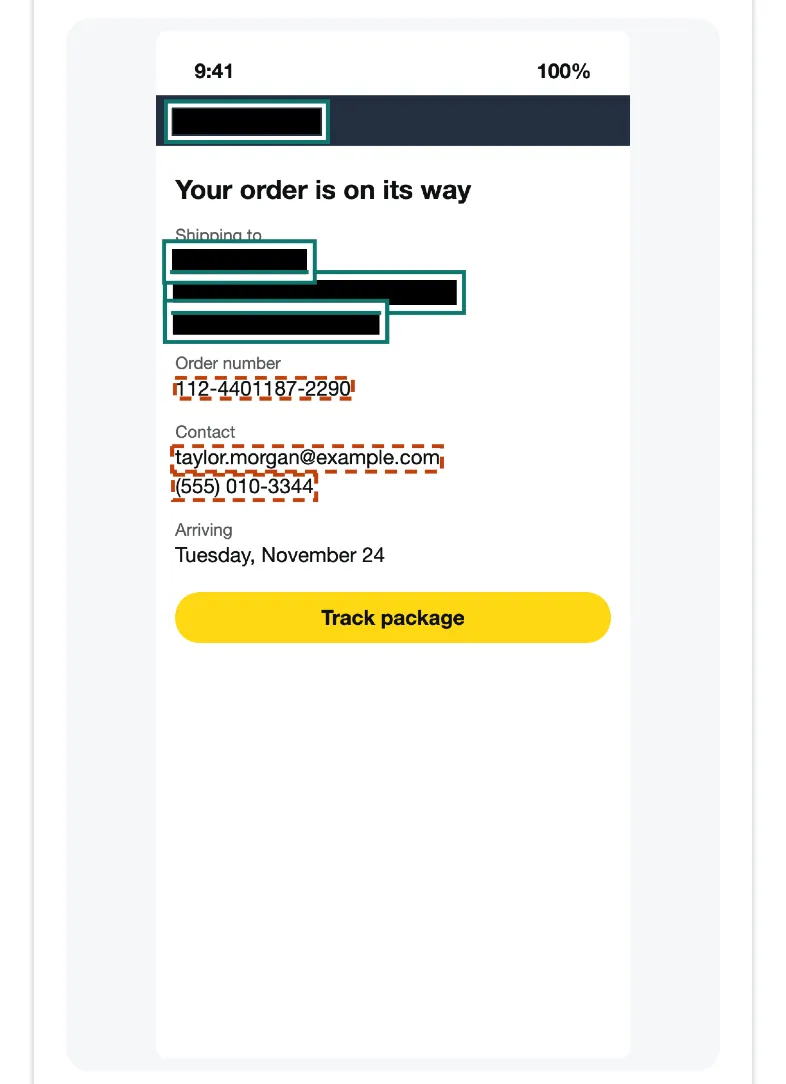
A fictional “Example Store” order confirmation in Pip at iPhone 15 size. The name and the two address lines were covered automatically; the order number and phone number were found and outlined for you to choose.
On that screenshot, all 3 address details were covered automatically in 0.5 seconds (WebKit, Safari’s engine, on a Mac with an Apple M4 chip, November 22, 2026). With All private text selected instead, the order number, the email and the phone number are covered too: 6 of 6.
What about house numbers and street signs?
These are harder. A text reader is built for documents; brass numbers on a brick wall, a sign at an angle or a number half in shadow often don’t come out as text, and Pip only covers what it can read. For photos, it also looks for short rows of characters (that’s how it finds license plates), so plain numbers on a plain background are often found. Decorative ones usually aren’t.
Turn on Draw a box and drag over:
- the house or apartment number and the mailbox,
- street signs and corner shops that pin down the block,
- package labels and envelopes on a table,
- car plates in the driveway; see how to blur a license plate.
Does the photo file itself give the address away?
Often, yes. A photo taken with location on carries the GPS coordinates of where it was taken, so a picture of your living room can point to your house even with nothing visible in it. The copy Pip saves is redrawn from the pixels and carries no location, camera or date data; if the original had a location, the tool says so. If you want to send a photo as it is, without covering anything, use the remove location tool, which strips the data without re-saving the picture.
How do you get your house blurred on Google Street View?
Open your house in Street View, use Report a problem at the bottom right of the image, and say what to blur. Google’s help page and Street View policy say house blurs need proof of address and that once applied, the blur is permanent. Faces and license plates are blurred automatically.
Which other details are worth covering when you sell something online?
When you photograph an item to sell at home, the background tells strangers about the place. Besides the address, consider covering mail and bills (account numbers too; see how to black out a bank statement), framed photos with faces, a school calendar on the fridge and the view out of a window. A plain wall or a sheet behind the item avoids most of it.
Questions people ask
How do I blur my address in a screenshot of an order or a delivery?
Open the screenshot in the tool on this page with Address selected. Street lines, apartment numbers and city, state and ZIP lines are covered, along with the name above them; check the result, tap anything it missed, and save.
Can it find the house number on my front door?
Sometimes. Big, plain numbers on a contrasting background are read; decorative numbers, numbers at an angle or in shadow often aren't. Turn on Draw a box and drag over them.
Can I get my house blurred on Google Maps?
Yes, on Street View: open the image, use Report a problem at the bottom right, and choose what to blur. Google says house blurs need proof of address and are permanent.
Does a photo of my house reveal where I live even if I blur the number?
It can, through the street sign, the view, a car's plate, or the photo file's own GPS location. Pip's saved copy has no location data; cover the rest with Draw a box.
Related
- Blur a license plateCover a car's license plate before you post or sell. Pip finds the plate in your browser and saves a copy without location data. Free, nothing uploaded.
- Remove photo locationSee whether a photo carries its GPS location, camera and date, then save a copy without them, without re-saving the picture. In your browser, free.
- Black out a bank statementBlack out account, routing and card numbers on a bank statement before you send it. Found for you in your browser; nothing uploaded. Free, works on phones.
- All guidesEvery Pip guide, by task.